 Brisk
Brisk Agent Kit
A small companion app for Brisk's Ask AI. It lets Brisk run the AI agent you already use, Claude Code for now, on the file or folder you have open. Brisk never connects to the internet on its own, and from inside the App Store's sandbox it can't start other programs, so the Kit starts the agent for it.
What it adds
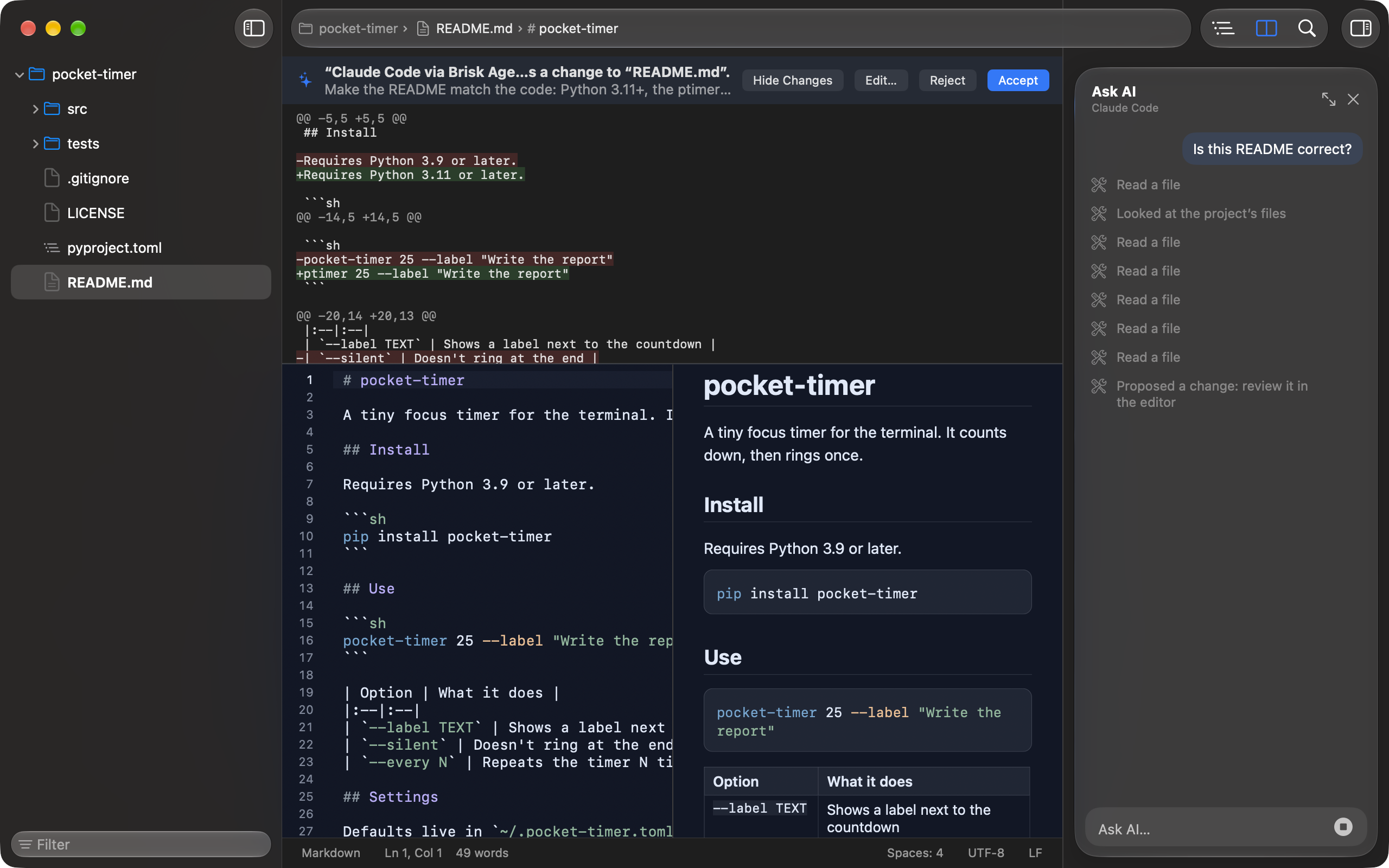
- Ask AI. Select some text and press ⇧⌘A, or open the Ask AI pane, and ask. Claude Code answers beside your text, in the same window, with each step it takes listed as it goes.
- Only Brisk's tools. The agent works through Brisk alone: no shell, no other servers, no files outside the folder of the window you asked in. In a window with a single file, it sees that file and nothing else. Files that usually hold secrets, like
.envand keys, are always off limits. - Edits you review. A change the agent proposes shows in the editor with the difference marked. Accept, edit or reject it: nothing changes until you say so, and an accepted change is one step you can undo.
- Command-line agents. Ask AI works with Claude Code now. Other agents that run in Terminal may follow.
Without the Kit, Brisk is the whole editor, with Shortcuts and Spotlight, and Siri AI when it comes. Ask AI is the only thing the Kit adds.
Set up Claude Code
You need a Mac with Apple silicon and macOS 26 or later, Brisk from the Mac App Store, and a Claude plan that includes Claude Code, or an Anthropic Console account.
- Install Claude Code, following Anthropic's instructions. On a Mac, paste this in Terminal:
curl -fsSL https://claude.ai/install.sh | bash - Run
claudeonce in Terminal and sign in, following the prompts in your browser. Then you can close Terminal: Brisk starts Claude Code by itself when you ask. - Download Brisk Agent Kit from the top of this page, open the disk image, and drag Brisk Agent Kit to Applications.
- Open Brisk Agent Kit and click Connect next to Claude Code. That only lets Brisk run it for Ask AI: nothing is added to Claude Code's settings.
- In Brisk, select text and press ⇧⌘A, or right-click and choose Ask AI…, or open the Ask AI pane with View › Show Ask AI (⌥⌘A). Then ask.
If Ask AI is greyed out
- “Connect an agent in Brisk Agent Kit” under Ask AI means no agent is connected yet. Open the Kit and click Connect next to Claude Code. If the Kit says Claude Code isn't installed, install it (step 1) and open the Kit again.
- “Update Brisk Agent Kit to use Ask AI” means your Kit is older than your Brisk. Download it again from this page.
- No Ask AI in the menus at all means Brisk can't find the Kit. Brisk and Brisk Agent Kit both need to be in your Applications folder. Brisk's Settings › Agents says what's missing.
Uninstall
Open Brisk Agent Kit and click Uninstall…. It lists what it will undo, and asks for Touch ID or your login password before it starts. Then it:
- Tells Brisk to stop listening for agents and to forget what you allowed them.
- Deletes its own files: its status, the agents you allowed, caches and preferences.
- Moves itself to the Trash. Quit it to finish.
Claude Code and its settings stay as they were, since the Kit never changed them. Brisk keeps working without the Kit, Siri included.
Safe by design
- It talks only with Brisk. It opens no network connection and listens on no port. It has no updater, no analytics and no crash upload.
- It accepts only the real Brisk, checked by its signature, and Brisk accepts only the real Kit, checked the same way. A look-alike from anyone else is refused.
- It runs only an agent you connected, from where it's installed, after checking that it's signed by its maker, and gives it only Brisk's tools. Claude Code reaches Anthropic's service, as it always does.
- It edits no agent's settings. Connecting only tells the Kit that Brisk may run that agent for Ask AI.
- Nothing runs in the background, and there's no login item. The Kit runs when you open it or when Ask AI needs it, and quits when it's done or when Brisk quits.
- Signed with a Developer ID and notarized by Apple, so macOS checks it before it runs.
Check the download
To confirm the file is the one published here, compare its checksum with the one above:
shasum -a 256 ~/Downloads/Brisk\ Agent\ Kit*.dmg